
By 2026, up to 40% of healthcare visits might go online, says McKinsey. This change lets you add new tech without changing your whole clinic.
Using virtual front desk EHR integration is a big help. It lets you schedule and check insurance right in your current systems. This saves money and keeps your data safe.
Learn more about modern check-in workflows at this complete guide. Virtual front desk agents cut down on mistakes. They let your staff focus on more important tasks.
Key Takeaways
- Digital care is expanding across the nation
- Virtual services fit into existing EHR systems
- Scheduling and insurance checks take place in real time
- Patient data remains secure under HIPAA guidelines
- Staff members save time and reduce administrative strain
- Integration leads to better outcomes for patients and clinics
Understanding Virtual Front Desk Solutions
You want a system that handles patient interactions without burdening your staff. Virtual front desk solutions help you meet that goal. They deliver responsive communication and keep data accurate.
These services work inside your workflows. They reduce missed calls and long wait times.
Definition of Virtual Front Desk Agents
Virtual front desk agents work as an extension of your practice. They handle phone lines, schedule appointments, and provide essential information. Each agent works like a dedicated receptionist but needs fewer physical resources.
This approach keeps your tasks organized. It ensures swift support for patients at every step.
Key Features of Virtual Front Desk Services
Services often include automated reminders and seamless call routing. They also have secure compliance tools. You benefit from shorter queues because patients connect with the right person more quickly.
An EHR compatible virtual receptionist syncs appointment data and patient records in real time. This integration saves you from entering the same details twice. It leaves you free to focus on quality care.
The Importance of EHR Integration
You want workflows that save time and reduce confusion. Integrating your virtual front desk with Epic, athenahealth, or eClinicalWorks makes check-in smoother. It lets providers get real-time data.
When EHR solutions work together, they cut down on manual work and errors. Your team can check appointments anytime. Patients know their info is up to date everywhere.
Practices with integrated EHR solutions see many benefits:
- Faster admin tasks
- Real-time patient updates
- Less chance of lost data
Benefits of EHR Integration for Healthcare Providers
Improved connectivity means better communication and happier patients. You do less paperwork and get bills out faster. This lets staff focus on care.
Automatic syncing cuts down on transcription errors. This means more accurate records.
Challenges Faced Without Integration
Without integration, billing is slow, and communication errors happen. Staff spend more time on data entry. This can upset patients during important times.
Without a unified system, records can be incomplete. This might lead to missed diagnoses. Secure integration keeps data consistent.
How Virtual Front Desk Agents Operate
Your work flow gets a boost with automated help for after-hours tasks. These agents handle calls, check insurance, and solve complex issues. They use your EHR for real-time info.
This means less busy work for you. Your team can focus more on patients.
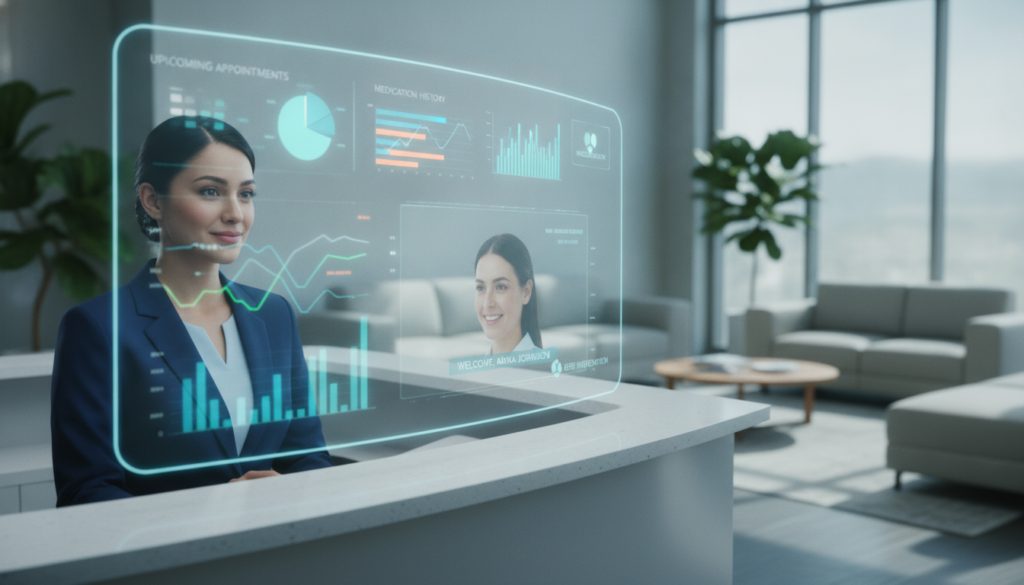
Workflow of Virtual Front Desk Agents
An agent answers calls, gets patient info, and checks for open times. They use your EHR to match requests with your schedule. This keeps your calendar up to date and confirms insurance.
They also handle refill requests and new patient sign-ups. This saves your team’s time.
Communication Between Agents and Staff
The system flags urgent calls and alerts the right team member. You get updates through secure channels, like Epic or Cerner. This way, every call is handled smoothly.
Technical Aspects of EHR Integration
Your virtual front desk setup often depends on how well it syncs with existing platforms. This approach lets you maintain accurate records and secure patient data at every step.
Compatible EHR Systems for Virtual Front Desks
You can connect your EHR compatible virtual receptionist with popular solutions from Cerner, Epic, and athenahealth. Each platform offers unique APIs that make data sharing smooth. It’s smart to choose a vendor with official integration modules.
This keeps data flowing smoothly in both directions. It also helps you avoid manual tasks.
Steps for Seamless Integration
- Verify the vendor’s HIPAA protocols
- Request permissions to exchange patient information
- Map data fields so everything remains consistent
- Test real-time flows to confirm reliability
- Adopt a certified approach to enhance data accuracy
This path ensures your practice benefits from a secure EHR compatible virtual receptionist. It keeps vital details in sync. You gain a consistent system that boosts efficiency and supports your team’s workflow.
Enhancing Patient Experience Through Virtual Services
Virtual front desk solutions change how patients check in. They make visits faster and more confident. This is thanks to quick responses and easy-to-use platforms.
Many clinics use Epic, athenahealth, or eClinicalWorks for a smooth transition. Patients get flexible scheduling and updates on forms and lab results. This makes communication clear and easy.
How Virtual Front Desks Improve Patient Engagement
Interactive dashboards make arrival easier and less confusing. Self-service tools let patients confirm appointments and reorder prescriptions. This makes patients feel more involved and builds stronger relationships.
Personalization Options for Patients
Returning patients find their records ready when they log in. Personalized workflows meet their needs, making care more enjoyable. This leads to higher satisfaction scores.
Virtual front desk technology boosts confidence in your services. It makes patients feel more involved in their care. This creates a welcoming atmosphere and keeps patients coming back.
| EHR Platform | Standout Feature | Patient Benefit |
|---|---|---|
| Epic | Real-time appointment views | Fewer missed sessions |
| athenahealth | Tailored messaging | Better follow-up response |
| eClinicalWorks | Simplified data sharing | Faster record updates |
Data Security and Compliance
Your practice needs to know that all protected health information stays safe. A strong virtual front desk EHR integration uses modern encryption and clear audits. This keeps sensitive records safe without losing convenience.

Ensuring HIPAA Compliance
You must sign a Business Associate Agreement with your chosen vendor. This agreement defines each party’s duties. It explains how patient data is handled, logged, and encrypted.
A well-planned virtual front desk EHR integration follows strict security rules. This makes sure your processes meet federal guidelines.
Safeguarding Patient Data During Integration
Encryption frameworks spot possible breaches and alert admins to odd activity. Strict policies track patient encounters, providing logs in real-time. These steps keep your data safe during transitions.
| Compliance Standard | Key Focus | Primary Safeguard |
|---|---|---|
| HIPAA | PHI Privacy | Encryption & Audit Trails |
| Business Associate Agreement | Vendor Accountability | Roles & Responsibilities |
| Security Framework | Data Protection | Real-Time Monitoring |
Evaluating the ROI of Virtual Front Desk Integration
You want to see clear results when you add an EHR compatible virtual receptionist to your team. It saves money on front desk staff. This means you can spend more on other important areas.
It also helps you cover all hours without gaps. Your business runs smoother, making more money for you.
Using automation helps cut down on costs. It keeps your key team members where they’re needed most. A virtual system handles the day-to-day questions.
This makes your team more productive. It also stops unexpected problems with staff.
Cost Savings for Healthcare Practices
By using an EHR compatible virtual receptionist, you save on salaries and benefits. Virtual tools work well and don’t need a lot of training. This saves your clinic’s budget and helps it grow.
Measuring Patient Satisfaction and Retention
You can check how happy patients are through surveys or Net Promoter Scores. If patients book again, it shows they trust your practice. These signs help you decide if you need to grow or tweak your virtual front desk.
| ROI Factor | Key Benefit | Performance Indicator |
|---|---|---|
| Reduced Payroll | Lower Expenses | Fewer Staffing Costs |
| Better Patient Retention | Higher Revenue | Increased Rebooking Rates |
Case Studies of Successful Implementations
Your practice can learn from real success stories. These clinics solved scheduling and front office problems. They used a virtual front desk that fits with their systems.
Real-World Examples of EHR Integration
One big facility used Epic to make check-ins faster and cut phone lines. A regional provider switched to athenahealth for quicker data sharing and easier scheduling. Another clinic chose eClinicalWorks to improve patient records and cut wait times.
Lessons Learned from Implementing Virtual Front Desks
Important lessons came from these changes:
- Training staff to handle extra work and patient questions
- Setting up data fields for consistent records in all areas
- Regular checks to make sure AI is working right
These steps keep things running well and avoid common problems. Your team will enjoy easier tasks, and patients will see shorter lines and clear updates.
| Provider | EHR System | Key Outcome |
|---|---|---|
| Mount Sinai | Epic | Accelerated Check-Ins |
| Johns Hopkins | athenahealth | Lower Wait Times |
| Mayo Clinic | eClinicalWorks | Better Data Coordination |
Future Trends in Virtual Front Desk Technology
Healthcare groups are moving to new ways for easy patient talks. Virtual systems are becoming more than just for greeting. They now handle scheduling, records, and talking to patients all in one.
Innovations Driving Virtual Health Solutions
AI, machine learning, and new layers of tech are making big changes. They help guess when patients might not show up and send them reminders. This gives a big edge, thanks to virtual front desk EHR integration.
Real-time updates help avoid wasted time and give teams quick access to patient info.
The Role of AI in Enhancing Virtual Front Desks
Smart tech can change patient times based on their past and habits. This makes clinics run better. It also helps give care that fits each patient’s needs with quick messages.
Using virtual front desk EHR integration puts your practice at the top of digital health. For more on this, check out industry insights. Moving forward with these tools can make care easier and more efficient for everyone.


