Did you know that 63% of US physicians report burnout symptoms, with administrative burden being the leading cause? Your practice doesn’t have to be part of this statistic. The solution lies in bringing skilled remote support onto your healthcare team, and it can happen faster than you think.
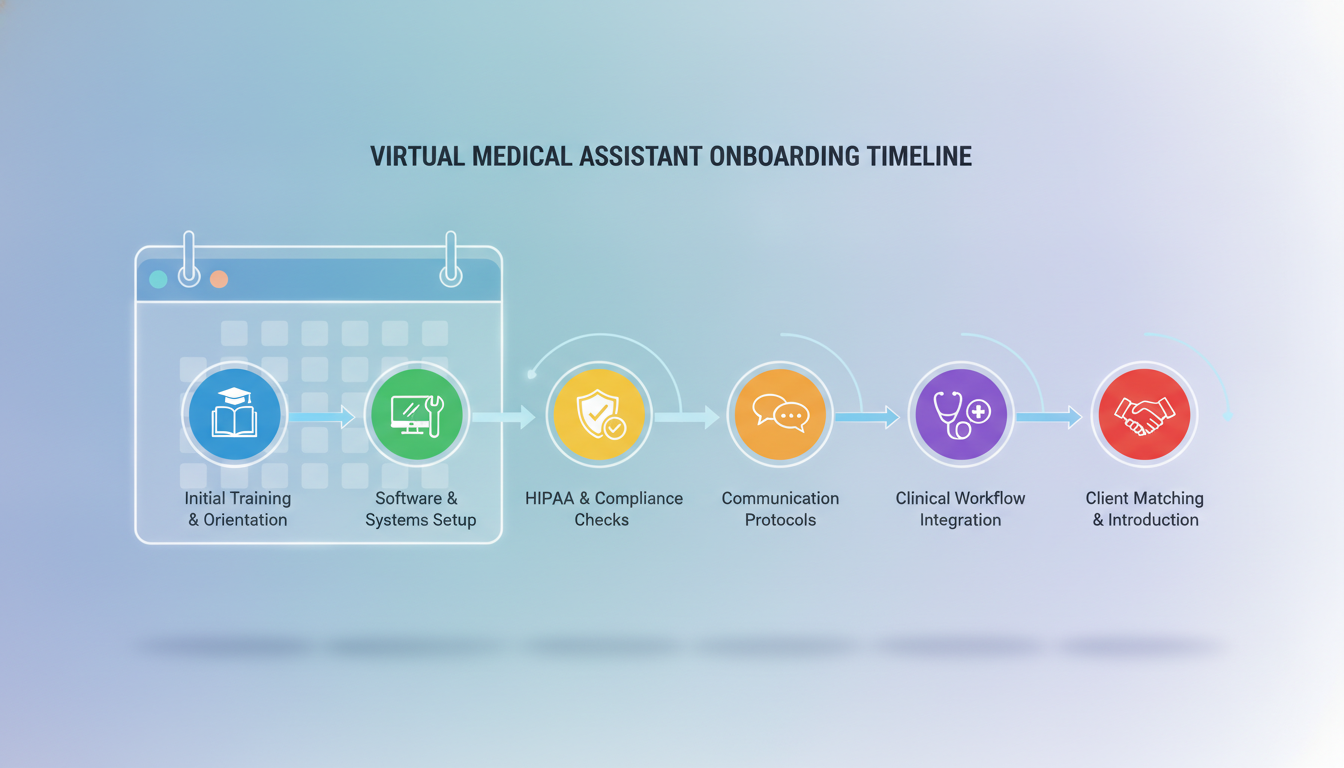
The VMA onboarding process doesn’t require months of preparation or complex implementations. With the right framework, you can have a fully trained staff member handling scheduling, prior authorizations, and documentation within 10 to 14 business days.
Many practice managers worry about maintaining quality standards and HIPAA compliance when adding remote staff. These concerns are valid, but they shouldn’t stop you from reducing physician burnout through virtual assistants who save an average of 1.7 hours per day on administrative tasks.
This guide walks you through a proven step-by-step approach. You’ll discover how to assess your practice needs, match the right candidate, set up secure system access, and implement specialty-specific training protocols.
The two-week timeline is both achievable and practical for practices of any size. When you follow this structured framework, you create the foundation for a long-term successful partnership that transforms your workflow efficiency.
Key Takeaways
- Complete VMA integration takes just 10-14 business days with proper planning and execution
- Structured phased approach covers needs assessment, system setup, and protocol training in distinct stages
- VMAs reduce physician administrative time by 35% on average within 60 days of deployment
- Medical scribing saves approximately 1.7 hours per day and is the highest-value use case
- Proper onboarding ensures HIPAA compliance and seamless integration with existing healthcare teams
- Two-week timeline works effectively regardless of practice size or specialty focus
Understanding the Role of a Virtual Medical Assistant
Before you start, you need to know what a virtual medical assistant does. Their role is key to your practice’s success. They handle many tasks that keep your office running smoothly, even if they’re not there.
This job has changed a lot with new technology. Now, remote assistants do complex tasks that used to need someone in the office. Knowing their duties from the start helps everyone work well together.
Core Administrative Duties
Virtual medical assistants are great at the behind-the-scenes work. They schedule appointments and manage your calendar. They also remind patients and handle any changes to their plans.
They also check in with patients after they’ve been treated. This helps patients feel cared for and can lower no-show rates.
They also handle billing and coding, which takes a lot of time. They deal with insurance claims and follow up on unpaid bills. They even handle denial management by fixing and resubmitting claims.
“The right virtual assistant doesn’t just complete tasks—they anticipate needs and solve problems before they escalate.”
They keep patient records up to date. They update records, add test results, and handle prescription refills. They also check insurance before appointments to avoid surprises for patients.
Critical Competencies for Success
Knowing the right skills is key when hiring a virtual medical assistant. They need to know medical terms to talk to patients and insurance companies.
They should be good with technology. Look for someone who knows:
- Electronic health record systems like Epic, Cerner, or Athenahealth
- Medical billing software and insurance portals
- Practice management platforms
- HIPAA-compliant communication tools
- Cloud-based collaboration applications
Communication skills are very important. They need to write well for emails and talk clearly on the phone. They must be kind and professional, even when patients are upset.
They must be detail-oriented to avoid mistakes in billing and records. They should be able to work well on their own and manage their time well.
Remote vs. On-Site Staff Distinctions
It’s important to know how virtual assistants are different from in-office staff. Virtual assistants work from home and may be in different time zones. This means you need to communicate differently and trust them more.
Virtual assistants do administrative and digital tasks, but not clinical ones. They can’t take vital signs or help with procedures. But they are great at computer tasks and work with fewer interruptions.
| Aspect | Virtual Medical Assistant | In-House Assistant |
|---|---|---|
| Work Location | Remote home office | Physical practice location |
| Primary Tasks | Administrative, billing, scheduling, records | Clinical support, patient intake, administrative |
| Equipment Costs | Minimal (provide own workspace) | Office space, supplies, equipment |
| Availability | Flexible hours, possible 24/7 coverage | Limited to office hours |
Costs are different too. Virtual assistants are usually independent contractors. This means you save on office space, equipment, and benefits. You only pay for the hours they work.
They offer flexibility. They can work extra hours to help with calls or insurance tasks outside regular hours. Some practices use them in different time zones for almost 24/7 coverage.
But, managing them is different. You can’t just walk over to check their work or give feedback right away. Success depends on clear communication and using technology to stay connected.
With this understanding, you’re ready to move forward. This knowledge will guide you in every step of the onboarding process, from job descriptions to setting expectations in those first two weeks.
Benefits of Hiring a Virtual Medical Assistant
Adding a virtual medical assistant to your team can really help your practice. It makes things better in many ways. You’ll see improvements in how your practice runs, how your staff works, and how you care for patients.
Many medical practices have seen big improvements after using virtual assistants. These changes happen quickly, in just a few weeks. Knowing how these changes help your practice is key.
Reducing Operating Expenses Without Sacrificing Quality
Using a virtual medical assistant can save you a lot of money. It’s cheaper than hiring someone to work in your office. You save on things like office space, computers, and employee benefits.
Virtual assistants cost 30-60% less than in-house staff. You only pay for the hours they work. This means you don’t pay for breaks or time off.
Virtual assistants don’t need a desk or computer. They work from home, saving you money on office supplies and equipment.
| Expense Category | In-House Assistant | Virtual Medical Assistant | Annual Savings |
|---|---|---|---|
| Base Salary | $42,000 | $18,000 | $24,000 |
| Benefits Package | $12,600 | $0 | $12,600 |
| Office Space & Equipment | $8,400 | $0 | $8,400 |
| Training & Development | $3,200 | $1,200 | $2,000 |
| Total Annual Cost | $66,200 | $19,200 | $47,000 |
Getting a virtual medical assistant is a smart choice. It saves you money and helps your practice grow without spending more on overhead.
Maximizing Staff Performance and Time Management
When virtual assistants handle paperwork, your staff can see more patients. Practices save 10-15 hours a week on paperwork and scheduling. This means more time for patient care.
Doctors and nurses can focus on what they do best. Virtual assistants handle scheduling, insurance, and records. This makes everyone more efficient.
The benefits are clear in many areas:
- Quicker intake forms and paperwork
- Less time on the phone with call management
- Smarter billing and coding
- More accurate data entry
- Organized patient files
Your practice runs better with a virtual assistant. They work long hours, even when your office is closed. This means work keeps going without interruption.
You’ll see more patients and less waiting. This means more money for your practice while keeping care high quality.
Elevating Patient Experience and Outcomes
Adding a virtual medical assistant boosts patient happiness. Patients get quicker answers and better care. This makes them more loyal and likely to recommend your practice.
Virtual assistants keep patients informed. They send reminders and updates. Patients feel heard and valued.
The benefits to patient care are many:
- Shorter wait times for appointments
- Better preparation for visits
- Help with medication and refills
- Extended hours for communication
- Smarter care coordination
Your practice becomes more focused on patients. Virtual assistants make sure no question goes unanswered. They keep detailed records for smooth care.
Happy patients stay with you and tell others. This builds a strong reputation. It’s a lasting benefit that helps your practice grow.
Knowing these benefits helps you make the most of your virtual assistant. The first two weeks are key to setting up systems for success. The benefits last long after the start, improving your practice and patient care.
Preparing Your Practice for Onboarding
How ready your practice is can make a big difference. A smooth onboarding takes just two weeks. But, if you’re not prepared, it can take a whole month.
Before your virtual medical assistant starts, you need to prepare. This preparation is like building a strong foundation. It helps your new team member start working right away.
Think of this stage as building the infrastructure for success. Without proper groundwork, you’ll spend valuable training time fixing technical issues and clarifying processes. With thorough preparation, you can focus entirely on skill development and integration.
Evaluating Your Practice’s Current Operations
Before you can delegate effectively, you need a clear picture of how work flows through your practice. Start by documenting every administrative task that happens during a typical week. This includes patient scheduling, insurance verification, billing procedures, medical records management, and follow-up communications.
Walk through each process step-by-step. Where do tasks originate? Who handles them currently? How long does each activity take? These questions reveal the true structure of your operations.
Pay special attention to bottlenecks that slow down your practice. Maybe patient calls go unanswered during busy hours. Perhaps insurance verification delays appointment scheduling. These pain points represent prime opportunities for virtual assistance.
Understanding your current state is the first step toward meaningful improvement. You cannot optimize what you have not measured.
Create a visual map of your workflow. Simple flowcharts work well for this purpose. They help you spot redundancies and inefficiencies that might be hidden. This exercise often reveals tasks you didn’t realize were consuming a lot of staff time.
Document time spent on each category of work. You might discover that your front desk spends three hours daily just answering routine questions. That’s fifteen hours weekly that a virtual medical assistant could handle, freeing your on-site team for patient-facing responsibilities.
Determining Which Responsibilities to Assign
Not every task suits remote delegation. Your healthcare VA setup succeeds when you match the right responsibilities to virtual support. The key is distinguishing between tasks requiring physical presence and those that can happen anywhere.
Start with high-volume, repetitive administrative work. These activities typically transfer well to virtual assistants. Appointment scheduling, prescription refill coordination, and insurance pre-authorization fall into this category. They require attention to detail but not on-site presence.
Consider the communication-intensive tasks that consume your day. Patient callbacks, appointment reminders, and follow-up scheduling are perfect for virtual delegation. These responsibilities keep your practice running smoothly but don’t require face-to-face interaction.
| Task Category | Virtual Assistant Suitable | Requires On-Site Presence | Priority Level |
|---|---|---|---|
| Appointment Scheduling | Yes – Full access to calendar system | No – Can be done remotely | High |
| Insurance Verification | Yes – Online portal access | No – Digital verification | High |
| Medical Records Scanning | No – Physical documents | Yes – Requires handling paper | Low |
| Patient Follow-Up Calls | Yes – Phone and notes access | No – Remote communication | Medium |
| Billing and Coding Support | Yes – Digital records access | No – Electronic systems | High |
Create three lists: daily tasks, weekly tasks, and monthly responsibilities. This organization helps your virtual assistant understand the rhythm of your practice. Daily tasks might include appointment confirmations and patient check-ins. Weekly responsibilities could involve insurance follow-ups and report generation.
Be realistic about complexity. Start with straightforward tasks during the first week. Add more sophisticated responsibilities as your assistant gains confidence and knowledge. This graduated approach prevents overwhelm and builds competence systematically.
Consider which tasks frustrate your current team most. These often make excellent candidates for delegation. When you remove tedious work from your staff’s plates, morale improves alongside productivity.
Establishing Your Technology Infrastructure
Your healthcare VA setup depends entirely on reliable, secure technology. Without proper systems in place, even the most skilled virtual assistant cannot perform effectively. Technology setup represents your most critical preparation task.
Begin with your practice management system. Your virtual assistant needs appropriate access levels to schedule appointments, view patient information, and manage administrative tasks. Work with your software vendor to create a user account with the right permissions. This process might take several days, so start early.
HIPAA compliance cannot be negotiable. Every communication tool and file-sharing system must meet federal privacy standards. Invest in secure, encrypted platforms designed for healthcare use. Standard consumer apps typically lack the necessary security features.
Essential technology components for your healthcare VA setup include:
- Secure practice management system access with role-based permissions
- HIPAA-compliant communication platform for messaging and video calls
- Cloud-based document storage with encryption and audit trails
- Virtual private network (VPN) for secure remote access
- Time tracking and task management software
- Password management system for secure credential sharing
Test every system before your assistant’s start date. Log in with their credentials to ensure access works correctly. Download any necessary software and verify compatibility. These technical checks prevent day-one frustrations that waste precious onboarding time.
Create detailed documentation for each system. Include login instructions, navigation guides, and troubleshooting tips. Screen recordings work exceptionally well for this purpose. Your assistant can replay these videos whenever they need reminders about specific processes.
Consider bandwidth and connectivity requirements. Your virtual medical assistant needs stable internet to handle phone calls and video communications. Discuss technical requirements upfront to avoid connection problems that disrupt patient care.
Security protocols deserve special attention. Establish clear guidelines about device usage, network security, and data handling. Your assistant should understand what’s permitted and what’s prohibited. Document these policies in writing so expectations remain crystal clear.
The technology foundation you build now will support not just this onboarding but every future virtual team member you add. Invest the time to do it right. Your two-week timeline depends on having these systems ready from day one.
Budget for necessary software licenses and subscriptions. Many healthcare-specific tools require per-user fees. Factor these costs into your planning. The investment pays for itself through increased efficiency and reduced training time.
Finding the Right Virtual Medical Assistant
Finding a virtual medical assistant is key to a smooth start. You need someone with the right mix of healthcare and tech skills. With a tight two-week timeline, you can’t afford to train someone from scratch.
Start with a candidate who’s already qualified. This means spending time on thorough searches and interviews. The right person will get up to speed quickly, saving you time and effort.
Reliable Sources for Healthcare Talent
Look for candidates on specialized platforms. Healthcare virtual assistant agencies have pre-checked professionals. They’ve already gone through background checks and training.
Job boards like indeed and ZipRecruiter are also good. They have filters for experience and skills, making it easier to find the right person.
LinkedIn and healthcare networks help too. They let you search for people with the right experience. You can see their credentials and work history.
Ask your colleagues for recommendations. They can suggest virtual medical assistants they’ve worked with. This saves you time and ensures you get a good candidate.
| Sourcing Method | Primary Advantages | Key Disadvantages | Best For | Typical Timeline |
|---|---|---|---|---|
| Specialized Healthcare Agencies | Pre-vetted candidates, compliance training completed, replacement guarantees | Higher cost, less direct control over selection process | Practices needing immediate starts with minimal risk | 3-5 days |
| Medical Job Boards | Large candidate pool, cost-effective, direct communication with applicants | Requires extensive screening, verification needed, time-intensive | Practices with flexible timelines and HR resources | 7-10 days |
| LinkedIn Professional Networks | Transparent work history, peer recommendations visible, passive candidate access | May require outreach to passive candidates, premium account helpful | Practices seeking experienced professionals with proven track records | 5-7 days |
| Professional Referrals | Pre-established trust, known performance history, cultural fit insights | Limited candidate pool, availability may be restricted | Practices prioritizing reliability and proven performance | 2-4 days |
Critical Qualifications and Experience Markers
Look for specific qualifications that show they’re ready to start. Medical assistant certification is a must. It shows they know the basics of healthcare.
Experience in medical offices is a must. You want someone who knows your workflow. This makes training faster.
Knowing your EHR system is a big plus. It means they can handle patient records and appointments quickly. Even if they’ve used different systems, they can learn yours fast.
They should know medical terms and procedures. This ensures they can talk to patients and insurance companies correctly.
They must have a good track record of keeping patient information private. This is key to avoiding legal issues and keeping patients’ trust.
Structured Interview Framework for Efficiency
Your interviews should be quick and to the point. Aim for 30-45 minutes. This saves time and gets you the info you need.
Start with technical questions. Ask them to explain how they schedule appointments or handle insurance. Listen for specific details that show they’ve done this before.
Test their communication skills with scenario questions. Ask them how they’d handle a difficult patient or explain billing issues. Good candidates will show empathy and problem-solving skills.
Check if they fit your culture by asking about their work style. Look for self-motivation and good communication skills. These are important for working remotely.
Give them a real challenge from your practice. Describe a busy day and ask how they’d handle it. Quality candidates will ask questions, set priorities, and explain their plan clearly.
Choosing the right virtual medical assistant is critical. Look for someone with healthcare experience, not just tech skills. The right person will be productive quickly and improve patient care right away.
Establishing Clear Communication Channels
Communication channels are key for a successful virtual working relationship in healthcare. When you hire a virtual medical assistant, you can’t rely on casual chats like in an office. Remote work needs clear structures to keep everyone connected and informed.
You need more than just emails or phone calls for your healthcare VA setup. You need systems that support all kinds of interactions, from urgent patient matters to routine updates. The choices you make in the first two weeks will help your virtual assistant fit in smoothly.
Why Open Dialogue Matters
Open communication builds trust with your virtual medical assistant quickly. When they feel free to ask questions or suggest improvements, you avoid mistakes and misunderstandings.
Remote workers face unique challenges. They can’t see your body language or the context of office conversations. They miss out on the team dynamics that develop in an office.
Clear communication is the bridge between confusion and clarity, when team members are apart.
Your virtual medical assistant needs permission to communicate often during onboarding. Tell them asking questions is okay during these first two weeks. This makes them feel safe and helps them learn faster.
Open dialogue also lets you understand your assistant’s work style and needs. You can adjust how you delegate tasks and guide them better.
Selecting the Right Communication Tools
Your tech choices affect how well your virtual medical assistant works with your team. The healthcare industry needs HIPAA-compliant solutions that protect patient info while keeping workflows smooth.
Here are key communication platforms for your healthcare VA setup:
- HIPAA-Compliant Messaging: OhMD, Spruce Health, or Tiger Connect offer secure channels for patient talks without privacy risks
- Project Management Systems: Asana, Monday.com, or Trello help with task assignments, tracking, and daily visibility
- Video Conferencing: Zoom Healthcare or Doxy.me enable face-to-face meetings for better rapport and conversations
- Shared Calendars: Google Workspace or Microsoft 365 keep scheduling clear to avoid double-bookings
- Document Collaboration: HIPAA-compliant Google Drive or SharePoint allow real-time editing and secure sharing
Set communication norms for different situations. For example, urgent patient matters might need a phone call, while updates work in your project system.
Make a simple guide for your virtual medical assistant. This guide helps them know where to send messages and avoids confusion during the busy onboarding period.
Creating an Effective Check-In Schedule
Regular check-ins give structure and support without micromanaging. The meeting frequency and format should change as your assistant becomes more confident and skilled.
In the first week, have daily check-ins of 15-20 minutes. These meetings help answer questions, clarify tasks, and catch problems early. Your assistant needs regular reassurance they’re on the right track.
In the second week, switch to every-other-day meetings of 20-30 minutes. Your assistant should be able to work more independently by then. Use these meetings to review work, address challenges, and introduce new tasks.
After the initial onboarding, move to weekly meetings for performance reviews, upcoming tasks, and professional growth. This balance lets your assistant show their skills.
Plan your check-ins with a consistent agenda:
- Review accomplishments
- Discuss obstacles or questions
- Clarify priorities
- Provide feedback
- Address concerns
Document key points from each meeting and share them with your virtual medical assistant. This creates a record for future reference.
Remember, communication is more than just scheduled meetings. Encourage your assistant to reach out when unsure. Your quick response builds trust and prevents delays that could harm patient care or practice efficiency.
The communication systems you set up now will benefit your practice for years. Spend time to get these structures right, and you’ll enjoy better collaboration with your virtual medical assistant.
Training Your Virtual Medical Assistant
How well you train your VMA is key to success. Without a clear plan, training can take too long. A good training plan helps your new team member feel confident and work well fast.
Break down training into easy-to-follow steps. Your virtual medical assistant learns best in focused sessions, not long days. This way, they avoid feeling overwhelmed and stay motivated.
Creating Your Day-by-Day Training Curriculum
Make a detailed training plan that covers all you need to teach. Each part should focus on a specific skill your assistant needs. This way, nothing gets missed in your short training time.
Start with the basics and then move on to harder tasks. This helps build confidence and reduces mistakes. It’s like building a house, starting with a strong foundation.
Here are some key areas to cover in your training:
- Practice protocols and procedures – Your unique workflow, documentation standards, and operational guidelines
- EHR system navigation – Patient record management, appointment scheduling, and system-specific features
- Patient communication standards – Phone etiquette, email templates, and message handling procedures
- Billing and coding basics – Insurance verification, claim submission, and payment processing
- Compliance requirements – HIPAA regulations, privacy protocols, and security measures
Have two to three focused training sessions a day, each lasting 45 to 60 minutes. Give breaks in between to practice what they’ve learned. This helps them understand and apply new skills.
“The goal of effective training is not to transfer all knowledge at once, but to build a foundation that enables independent problem-solving and continuous learning.”
Leveraging Digital Learning Resources
Online resources make training faster and more efficient. They help your virtual medical assistant learn HIPAA and other important skills. This frees you up to focus on specific practice needs.
There are many online platforms that offer specialized training. These include tutorials from EHR vendors and free HIPAA courses from the HHS Office for Civil Rights. They help your assistant learn at their own pace.
Use online courses as homework between live sessions. Review what they’ve learned together. This mix of online and in-person training is effective and efficient.
Implementing Remote Shadowing Techniques
Even with virtual assistants, shadowing is valuable. Use screen-sharing to let them watch you work. They learn by seeing you handle real tasks.
Do live screen-sharing sessions to show them your daily tasks. Explain your thought process in tough situations. This helps them learn to anticipate and solve problems.
Record your workflow for tasks they’ll do often. These videos help them review and ask questions. Build a library of common scenarios and best practices.
| Training Method | Best Use Case | Time Investment | Retention Rate |
|---|---|---|---|
| Live Screen-Sharing | Complex decision-making tasks | High initial, low ongoing | 75-80% |
| Recorded Demonstrations | Repetitive procedures | Medium initial, minimal ongoing | 65-70% |
| Supervised Practice | Skill validation and confidence building | High throughout training | 85-90% |
| Online Courses | Foundational knowledge and compliance | Low for trainer, high for learner | 60-65% |
Have supervised practice sessions where your assistant does tasks while you watch. Give feedback and guidance right away. This builds confidence and corrects mistakes early on.
Start with simple tasks and gradually get harder. Let them make small mistakes in a safe space. This helps them learn more than if you always correct them.
Use different training methods to fit different learning styles. Some learn by watching, others by doing. Mixing methods helps everyone learn well.
Keep track of their progress with simple checklists. Note what they’ve learned and what they can do. This shows you how ready they are for independent work.
Setting Goals and Expectations
Setting clear goals makes your VMA onboarding process better. When you set clear goals, your virtual medical assistant knows what to aim for. This makes learning faster and builds confidence.
Being specific is key. Vague instructions can lead to confusion. Instead, set clear, trackable goals for your assistant.
Goal-setting creates accountability on both sides. Your virtual medical assistant gets clear direction. You get to measure their performance. This avoids frustration and keeps everyone on the same page.

Establishing Clear Performance Metrics
Your virtual medical assistant needs clear goals to guide their work. These goals should match your practice’s standards. Start by identifying the most important tasks for your workflow.
Appointment scheduling accuracy is a key metric. Aim for 98% accuracy to avoid scheduling errors. This ensures patients get the right appointment times.
Responding to patient inquiries quickly is also important. Aim to reply within two hours for non-emergency messages. This keeps patients happy and informed.
Insurance verification must be done quickly to avoid claim denials. Target 100% completion within 24 hours. This gives your team enough time to handle coverage issues.
| Performance Indicator | Target Benchmark | Measurement Frequency | Week 1 Goal |
|---|---|---|---|
| Appointment Scheduling Accuracy | 98% or higher | Daily review | 90% accuracy |
| Patient Inquiry Response Time | Within 2 hours | Daily tracking | Within 4 hours |
| Insurance Verification Completion | 100% within 24 hours | End of each business day | 100% within 48 hours |
| Claim Submission Timeliness | Within 48 hours of service | Weekly audit | Within 72 hours |
Claim submission timeliness is critical for your revenue. Aim to submit claims within 48 hours. This reduces the chance of rejections and speeds up payments.
Patient satisfaction scores are important. Track ratings on scheduling, communication, and problem-solving. These insights show how well your assistant represents your practice, like virtual check-in processes.
Progressive goals build confidence through achievable wins. Don’t expect perfection on day one—create a roadmap that shows clear advancement.
Week-by-week progression matters as much as final targets. Your virtual medical assistant should master basic tasks first. Then, they can handle more complex tasks. For example, aim for 90% scheduling accuracy in week one and 98% by week two.
First-week goals should focus on learning the system and understanding processes. Your assistant needs time to get familiar with your software and protocols. Set goals that build a strong foundation.
Second-week goals should increase complexity and speed. By then, your assistant knows the basics and can handle more tasks accurately. This approach prevents overwhelm and keeps momentum.
Building Continuous Improvement Systems
A feedback loop turns one-time training into ongoing growth. Your virtual medical assistant needs regular feedback to improve and correct their approach. This continuous communication prevents small issues from becoming big problems.
Daily micro-feedback during the first week keeps learning on track. Give immediate, specific feedback on tasks as they’re done. This real-time guidance helps your assistant understand expectations before habits form.
Focus your early feedback on specific actions, not general performance. Instead of saying “good job,” point out exactly what worked. This specificity reinforces best practices.
Formal check-ins at the end of week one provide a full assessment. Schedule a 30-minute session to review progress, celebrate successes, and identify areas for improvement. This milestone creates a natural pause for reflection and realignment.
During these check-ins, review metrics against your targets. Discuss which tasks feel easy and which are challenging. This conversation helps adjust training for week two.
Weekly performance reviews for the first month keep accountability as your assistant becomes more independent. These sessions ensure consistent progress monitoring without micromanaging. Schedule them at the same time each week to establish routine.
After the first month, switch to monthly reviews for ongoing development. By then, your virtual medical assistant operates with more autonomy and needs less frequent formal evaluation. Monthly sessions focus on optimizing efficiency and expanding responsibilities.
Create a standardized review template that covers all key performance indicators. This consistency makes tracking improvement easy and helps identify trends. Include sections for quantitative metrics, qualitative observations, and goal-setting for the next period.
Encourage two-way feedback during every review session. Your assistant’s insights about workflow challenges or process improvements can reveal blind spots in your current systems. This collaborative approach strengthens the working relationship and drives mutual success.
Documentation of feedback sessions creates a valuable performance record. Keep notes on progress, challenges addressed, and goals set for each period. This documentation helps recognize patterns and provides reference points for future discussions.
The VMA onboarding process succeeds when expectations are clear and feedback flows consistently. Your investment in structured goal-setting and regular communication pays off through faster competency development and stronger long-term performance. This systematic approach eliminates uncertainty and creates a culture where continuous improvement is the norm.
Integrating Your Assistant into Your Team
True onboarding doesn’t just stop at teaching tasks. It’s about making your virtual medical assistant a part of your team’s culture. Even though they’re far away, you can build real connections. This makes your healthcare VA setup much more successful.
It’s important to focus on the cultural and relational parts of integration. These aspects help your virtual medical assistant stay with you for years, not just months. If they feel left out, productivity drops and turnover goes up.
Fostering Team Collaboration
Start by having everyone introduce themselves with videos. This helps create connections that emails can’t. Also, have a welcome meeting in your first week to make your virtual assistant feel valued.
Make a team directory with photos, contact info, and fun facts. This helps your assistant understand who does what and starts conversations. Update it often as your team changes.
Pair your virtual assistant with an on-site team member for support. This buddy helps with questions and understanding the team. They become an advocate for your remote assistant.
“The strength of the team is each individual member. The strength of each member is the team.”
Use team chat platforms for casual talks. These spaces help build relationships and celebrate wins. Make sure your virtual assistant joins in to feel included.
Encouraging Inclusion in Meetings
Include your virtual assistant in meetings, even if they’re not directly involved. This helps them understand the practice better. It also makes them more invested in goals.
Weekly huddles are key for virtual attendance. They cover updates and team concerns. Your assistant gets real-time info, not just second-hand reports.
Make sure your virtual assistant attends important meetings. This includes updates and training sessions. They should be there for any meeting where they’d miss out if absent.
But not all meetings need virtual attendance. Skip quick problem-solving sessions or spontaneous chats. Use your judgment to balance inclusion and respect their time.
- Weekly team huddles for practice updates and coordination
- Monthly staff meetings covering policy changes and initiatives
- Quarterly training sessions for professional development
- Department-specific meetings relevant to delegated tasks
- Annual planning sessions that shape practice direction
Using Collaborative Tools
Collaborative platforms help your virtual assistant feel close to the team. Tools like Google Workspace and Microsoft 365 offer shared spaces for projects. They make remote work feel natural.
Project management boards give your assistant a view of the bigger picture. Platforms like Trello and Asana show how tasks fit into the practice’s goals. This builds appreciation for teamwork.
Consider these tools for your healthcare VA setup:
| Tool Type | Purpose | Examples | Integration Benefit |
|---|---|---|---|
| Communication Platforms | Instant messaging and video calls | Slack, Microsoft Teams, Zoom | Enables real-time conversations and quick problem-solving |
| Document Collaboration | Shared file creation and editing | Google Docs, Office 365, Dropbox | Allows simultaneous work on patient materials and reports |
| Project Management | Task tracking and workflow visibility | Asana, Trello, Monday.com | Shows how individual tasks fit into practice goals |
| Screen Sharing | Training and troubleshooting support | Loom, TeamViewer, AnyDesk | Facilitates visual learning and technical assistance |
Virtual team-building activities strengthen bonds. Schedule social calls and celebrate milestones. These efforts improve engagement and retention.
When your virtual medical assistant feels connected, they bring enthusiasm and commitment. Integration turns a remote worker into a dedicated team member who cares about collective success. This emotional investment makes your onboarding effort valuable and sustainable over time.
Maintaining Compliance and Privacy
Following federal privacy rules is a must for virtual medical assistants. Not following these rules can lead to big fines and even jail time. Make sure to include compliance training from the start.
Your practice’s good name and legal safety depend on team members knowing their privacy duties. Virtual assistants work from home, where security is harder to keep. So, they need special training.
Working from home brings special risks. Your assistant might share space with family, use public Wi-Fi, or be overheard. They need training that covers these risks well.
Federal Privacy Law Fundamentals
HIPAA rules are key for protecting patient info in the US. Your virtual assistant must know what protected health information is. This info includes names, addresses, and medical details.
The law is clear about when sharing patient info is okay and when it’s not. Your assistant needs to know when it’s right to share and when it’s wrong. Sharing with family or on social media is wrong.
Remote workers need strong security to follow HIPAA. Your assistant must use special security steps to keep patient information safe. This is more than just passwords.
Before they can see patient data, they need to follow these steps:
- Use a Virtual Private Network (VPN) for all connections
- Use multi-factor authentication on all platforms
- Use encrypted hard drives on work devices
- Lock screens after a short time of inactivity
- Dispose of printed documents securely
Business Associate Agreements are key for working with your virtual assistant. This agreement shows they know HIPAA rules and are bound by them. Without it, you can’t let them see patient info.
Comprehensive Compliance Education
Training for HIPAA VMA needs to be specific for remote work. General training won’t cover the unique risks at home. You need to make training that tackles these risks head-on.
Focus on security in remote work. Teach about the dangers of public Wi-Fi, the need for a dedicated workspace, and how to keep devices safe. These topics are often overlooked in basic training.
Use real-life examples to make compliance training stick. Give your assistant scenarios they might face:
- A family member asks about a patient they know
- Fixing technical issues that might expose patient data
- Handling a possible security breach, like a lost device
- Deciding when to share patient info with patients
Keep records of compliance training to prove it happened. Make a detailed checklist for your assistant to sign. This checklist should cover all important compliance topics.
This checklist should check if your assistant knows about security, sharing info, reporting breaches, and keeping their workspace safe. This document is part of your compliance records and shows you’re serious about following the rules.
Keep up with compliance training after the first time. Review privacy policies and updates to laws regularly. Healthcare laws change, and your assistant needs to stay up-to-date.
Make sure your assistant knows the serious consequences of breaking privacy rules. Share examples of big fines and penalties for HIPAA violations. This helps them understand why following rules is so important.
Test if your training worked by giving a quiz. Make sure your assistant scores at least 90% to show they understand. This quiz should cover all key topics.
Plan to spend at least two full days on privacy and compliance training in your two-week onboarding. This shows how important these topics are. Don’t rush through training to save time. The risks of not doing it right are too big.
Utilizing Technology for Onboarding
Choosing smart technology is key to a smooth onboarding process. The right tools speed up your timeline and standardize training. They also create resources your virtual medical assistant can use anytime.
Technology turns onboarding from a slow process into an efficient system. You save hours and your new assistant gets quality training. This ensures a smooth start for them.
Essential Digital Tools for Efficient Training
Your toolkit should include several key technologies. Learning management systems like TalentLMS organize your training. They let your assistant learn at their own pace.
Screen recording tools like Loom make training videos easy to create. You show a process once and your assistant can watch it as many times as needed. This is great for showing how to use software.
Password management solutions like LastPass solve the problem of sharing passwords securely. They let you share access without giving out passwords. This keeps your information safe.
Time tracking software like Toggl helps you see how long tasks take. It shows where your assistant might need more help. This helps you catch problems early.
Onboarding checklists in tools like Process Street make sure nothing is missed. They send reminders and assign tasks. This keeps everyone on track.
The best onboarding programs use technology to handle routine tasks. This lets you focus on coaching and building a connection with your assistant.

| Tool Category | Primary Function | Time Savings | Key Benefit |
|---|---|---|---|
| Learning Management Systems | Organize training modules | 5-7 hours weekly | Self-paced learning with progress tracking |
| Screen Recording Software | Create visual demonstrations | 3-4 hours weekly | Reusable training videos for complex tasks |
| Password Managers | Secure credential sharing | 2-3 hours weekly | Safe access without password exposure |
| Time Tracking Tools | Monitor productivity | 1-2 hours weekly | Identify training gaps quickly |
| Process Checklists | Ensure completion | 4-5 hours weekly | Nothing gets forgotten during onboarding |
Automating Your Training Workflow
Streamlining onboarding means setting up automated workflows. These send training materials at the right time. Your assistant gets Day 1 materials on their first day, and so on.
Having a library of standard operating procedure documents speeds up onboarding. These documents include step-by-step instructions and troubleshooting tips. Your assistant can find answers on their own, saving you time.
Shared knowledge bases in tools like Notion become your go-to resource. You document processes once, and your assistant can access them anytime. This reduces questions and builds confidence.
Technology should enhance, not replace, human connection during onboarding. While it handles basic knowledge, you need regular video calls and feedback. This lets you focus on coaching.
Remember, HIPAA compliance is key when choosing onboarding technology. Any tool handling patient info needs a Business Associate Agreement and security features. Many platforms offer healthcare-specific versions with enhanced privacy.
By balancing automation with personal interaction, your assistant learns foundational material independently. You focus on specific guidance and complex scenarios. This makes your two-week timeline achievable.
The technology you invest in during onboarding pays off long-term. Your training library grows, benefiting future assistants. This makes onboarding cycles faster and more efficient.
Monitoring Progress and Performance
Effective monitoring turns the VMA onboarding process into a success story. You need to track your virtual medical assistant’s progress. This ensures they develop skills on schedule.
In the first two weeks, check their performance often. This helps you see their strengths and weaknesses. You can then work on improving their weak areas.
Monitoring helps build trust and confidence in your new team member. You need clear goals to measure their progress. Set strategic checkpoints throughout the onboarding timeline for adjustments and celebrations.
Your monitoring should balance watching closely and giving freedom. Too much watching can hurt confidence. Too little can hide problems. Finding this balance helps your virtual assistant grow while getting help when needed.
Structured Performance Checkpoints
The first two weeks need specific evaluation milestones. The first review should be at the end of week one. It checks if your assistant understands the basics.
Week one focuses on learning, not speed. You’re checking if they get the “why” behind things. This is important for solving problems when unexpected things happen.
The final review at two weeks checks if they’re ready to work alone. This review looks at both skills and soft skills. You’ll check their task completion, communication, and how well they follow your practice’s rules.
After the first two weeks, have monthly reviews for the first quarter. These reviews help your assistant keep growing and catch any problems early. They also let you give them more responsibilities as they get better.
Comprehensive Evaluation Framework
Your reviews should look at both numbers and how they interact with others. Numbers show part of the story, but how they work with people is key for success.
Quantitative metrics give you clear data to track and compare. Look at tasks done, accuracy, how fast they respond, and if they meet deadlines. A simple spreadsheet helps you see how they’re doing and spot trends.
| Performance Metric | Week 1 Target | Week 2 Target | Month 1 Target |
|---|---|---|---|
| Patient Calls Handled | 10-15 daily | 20-25 daily | 30-40 daily |
| Scheduling Accuracy | 85% | 92% | 97% |
| Data Entry Completion | 70% | 90% | 100% |
| Response Time (hours) | Within 4 | Within 2 | Within 1 |
Qualitative assessments look at the human side. Check their communication, professionalism, problem-solving, and teamwork. These things affect patient happiness and how well your practice works.
It’s also important to check if they fit your practice’s culture. If they don’t, it can cause problems even if they’re good at their job.
Effective Feedback Delivery
How you give feedback is very important. Use the situation-behavior-impact method. This way, you can talk about problems without being too harsh.
For example, instead of saying “You’re too slow,” say: “Yesterday (situation), scheduling took eight minutes per call (behavior). This left three patients on hold for a long time (impact).”
This kind of feedback helps your assistant know what to work on and why it’s important. Vague feedback like “do better” doesn’t help.
Always balance feedback with positive comments. Acknowledge their good work and improvements. This motivates them to keep getting better.
Adaptive Role Optimization
Your initial tasks might not match your assistant’s strengths. Monitoring helps you find these mismatches. Being flexible with roles helps your practice get the most from your team member.
If they’re good at talking to patients but struggle with billing, give them more communication tasks. Train them more on billing. This way, you use their strengths and improve their weaknesses.
Watch for tasks that are hard for them, even after training. Some problems need more practice. Others show you need to change their role. Knowing this helps you make smart changes.
Keep a record of any role changes and why you made them. This helps explain things to your assistant and gives you insights for future hires. You’ll learn what tasks work well together and what don’t.
Warning Signs and Interventions
Some signs show the onboarding isn’t going well. Mistakes on the same tasks mean training or instructions need work. Fix these by reviewing procedures, giving more examples, and checking if they understand.
If they’re afraid to ask questions, make it okay. Praise them for asking and tell them it’s normal. This helps them feel safe asking for help.
Missed deadlines are serious because they affect patient care and your practice. Find out why it happened and fix the real problem, not just the symptom.
Acting fast on small problems prevents big ones later. The first two weeks set patterns that last. Your quick action and monitoring help your virtual assistant succeed in supporting your practice.
Final Thoughts on a Successful Onboarding Journey
Your two-week onboarding period is just the start. It’s the beginning of a strong partnership with your virtual medical assistant. The foundation you’ve built is key for long-term success in your practice.
Reflecting on Lessons Learned
Take time to think about what worked well during onboarding. Have a debrief with your virtual medical assistant to get their thoughts. Ask them which training parts were most helpful and which were unclear.
Document the challenges and solutions you found. These notes will help when you grow your virtual team. Your assistant’s view on HIPAA VMA training and workflow is very valuable.
Planning for Ongoing Development and Support
Make a plan for ongoing growth that goes beyond the first two weeks. Have monthly coaching sessions to tackle new challenges and add new tasks. Hold quarterly goal-setting meetings to keep your assistant motivated and growing.
Invest in ongoing education, like updates on regulations and new procedures. Your virtual medical assistant’s growth improves your practice’s efficiency and patient care.
Celebrate this achievement but remember growth never stops. The onboarding you’ve done leads to a lasting professional relationship. This strengthens your whole healthcare operation.


