
Nearly 67% of healthcare providers spend more time on paperwork than with patients. This has made many small clinics rethink their daily tasks.
Running a small clinic is tough. You face high costs and less time with patients. Budget limits your hiring choices.
Remote help through healthcare efficiency solutions is a new option. You can get help with scheduling, billing, and records without hiring full-time staff. This is attracting doctors who want better medical practice management without extra costs.
The real question is if this tech solution is worth it for your clinic. Knowing the costs and benefits will help you decide. It’s about finding the best way to manage your clinic and care for patients.
Key Takeaways
- Remote support cuts down on costs compared to hiring staff in-house
- Healthcare providers spend nearly two-thirds of their time on paperwork
- Flexible staffing models let you adjust support based on patient needs
- Remote professionals handle tasks without needing office space
- Assessing your clinic’s needs helps decide if this solution is right for you
Understanding Virtual Medical Assistants
If you run a small practice, you might wonder if remote help can help. Remote healthcare support is becoming popular for saving money. Virtual medical assistants help with tasks that keep your practice running well.
These professionals work from home but are part of your team. They handle tasks like scheduling and insurance checks. This way, you get help without the usual costs of in-office staff.
Virtual and traditional medical assistants are different only in where they work. They have the same skills and training. They just use digital tools to do their jobs.
What They Do and How They Operate
Virtual medical assistants help your practice from home. They do tasks like scheduling and managing records. They also handle things like medication refills.
What they do depends on your state’s rules and your practice’s needs. Some virtual assistants specialize in certain medical areas. Others help with general tasks.
For solo practices, virtual assistants are very helpful. They help you focus on patient care while handling the business side. They work when you need them and can even work outside regular hours.
“Virtual medical assistants are key for small practices. They help compete with big systems while keeping patient care personal.”
Core Capabilities and Qualifications
Virtual medical assistants have important skills. Knowing these helps you see how they can help your practice.
- Certified Training: Most have certifications and keep up with continuing education.
- Technology Proficiency: They know how to use electronic health records and other software.
- HIPAA Compliance: They get training on keeping patient information safe.
- Flexible Availability: They work when you need them, even outside regular hours.
- Specialty Knowledge: Some have experience in specific medical areas, like pediatrics.
They use secure messaging and video calls to work with your team. They can access patient info and update records in real-time.
Good services make sure their staff stays up-to-date. You don’t have to worry about their training.
Advantages for Your Practice
Using virtual assistants changes how your practice works. It’s not just about saving money. It also improves your workflow and patient happiness.
Cost reduction is a big plus. You save on office space, equipment, and benefits. They work as contractors, cutting down on costs.
Your practice can be open longer. Virtual assistants handle requests and questions outside office hours. This makes patients happier without you working more.
Having less paperwork means you can focus more on patients. This can make you less stressed and happier at work.
Virtual assistants make staffing more reliable. They cover when your staff is out. This keeps your practice running smoothly.
Virtual assistants can be tailored to your needs. They fit into your workflow, no matter your specialty. They provide specialized help that regular staff can’t.
Why Small Practices Need Virtual Support
As a small practice owner, you face many challenges every day. You have limited resources and tight budgets. Finding good solutions is key to your success.
Unlike big healthcare systems, you handle both clinical and business tasks. Staff absences or turnover can hurt patient care. Virtual support offers flexible help that fits your needs.
Reducing Operational Expenses
Hiring a virtual medical assistant saves money. You don’t need to pay for office space, equipment, or phones. This cuts down on big costs.
Virtual assistants don’t need benefits like health insurance or retirement plans. This saves you a lot of money. You can use this money for other important things.
With virtual support, you avoid extra costs for payroll taxes and workers’ comp. This means you keep more money for your practice. You can offer better care and services.
Most small practices save 30-50% on staffing costs with virtual support. This extra money lets you grow your practice. You can buy new equipment or offer more services.
Maximizing Your Productive Capacity
Working with a virtual assistant changes how you spend your time. You can focus on patient care instead of paperwork. This makes your work more efficient.
Virtual assistants work for you 24/7. They handle calls and paperwork while you see patients. They keep your records up to date and confirm appointments.
This means you can do more without working longer hours. Your practice runs smoothly with less stress. You start each day ready to go.
Virtual assistants learn your needs over time. They help avoid scheduling problems and keep patients informed. Your practice runs better with less hassle.
- Complete documentation during off-hours without overtime costs
- Handle patient inquiries promptly without interrupting clinical time
- Process insurance verifications continuously throughout the day
- Manage appointment scheduling across multiple time zones
- Maintain consistent follow-up communication with all patients
Enhancing Clinical Outcomes
Less paperwork means better patient care. You have more time for each patient. Your consultations are more thorough and personal.
Virtual support lets you offer better patient care. Assistants handle reminders and test results. Patients feel more connected to your practice.
Wait times go down with virtual assistants. They fill your schedule and reduce no-shows. Patients get care faster.
Follow-up care quality improves dramatically with virtual support. They send reminders and monitor medication. This makes patients happier and care better.
You can also respond to patient needs quickly. Virtual assistants handle messages and urgent issues. This builds trust and prevents problems.
These improvements make your practice better known. Happy patients tell others. Your practice grows because of the care you provide, with help from virtual assistants.
Services Offered by Virtual Medical Assistants
Working with virtual medical assistants gives you access to many services for healthcare settings. These medical office services help your practice run smoothly without extra costs. Knowing what small clinic outsourcing means helps you decide what tasks to outsource.
They handle three main areas that take up a lot of time in any medical office. Each area tackles specific problems that small practices face every day.
Appointment Calendar Management
Your virtual assistant manages your schedule with great care and speed. They book new appointments, send reminders, and confirm visits to cut down on no-shows.
They arrange appointments wisely, saving your time and preventing overbooking. This keeps your schedule full but not too busy.
When patients need to change their appointments, your virtual assistant makes new times without disrupting you. They use intelligent scheduling systems that fit your practice and patient needs. This makes your daily schedule run smoothly.
Key scheduling tasks include:
- Managing calendars for practices with many doctors
- Coordinating complex appointment sequences for patients needing multiple visits
- Blocking time for procedures, meetings, and admin tasks
- Adjusting schedules in real-time for unexpected changes or emergencies
- Generating reports to find ways to improve scheduling
Patient Interaction Hub
Virtual medical assistants act as your practice’s communication center. They handle all patient inquiries and requests. They answer calls professionally, showing the courtesy and knowledge patients expect.
They quickly respond to messages in the patient portal, making sure no question is left unanswered. They also make follow-up calls after visits to check on patients and address any concerns.
Before visits, they gather patient info and medical history updates. This saves time during appointments and helps you make informed decisions. They also answer routine questions according to protocols you establish, filtering out complex issues.
These medical office services keep your practice’s reputation high while saving your time. Patients get quick answers without interrupting your care.
Communication tasks include:
- Triaging urgent calls and messages according to your guidelines
- Conducting patient satisfaction surveys and collecting feedback
- Sending educational materials and post-visit instructions
- Coordinating with pharmacies for prescription questions
- Managing waitlist notifications when slots open up
Back-Office Operations
Administrative tasks in medical practices go beyond patient care. Virtual assistants handle many back-office tasks that take up a lot of staff time every day.
They check insurance coverage before appointments, avoiding billing problems and making sure patients know their costs. They also send prior authorization requests to insurance companies and follow up until approved.
They handle prescription refills according to your rules. They manage medical records, keeping them organized, accessible, and up to date. This part of healthcare BPO greatly reduces your team’s workload.
They help with billing, coding, claim submissions, and payments. They also do data entry to keep your electronic health records accurate.
They arrange patient referrals to specialists, scheduling appointments and transferring records. They also keep compliance documents up to date, helping your practice meet rules without using staff time for paperwork.
By outsourcing these virtual healthcare tasks through small clinic outsourcing, your staff can focus on patient care and clinical support. This teamwork boosts your team’s performance while keeping costs down.
Cost Comparison: In-House vs. Virtual Assistant
Smart decisions about healthcare staffing costs start with a detailed financial analysis. This analysis reveals all hidden expenses. Your practice needs more than basic salary comparisons to understand the true economic impact of different staffing models.
The financial landscape of medical staffing has changed a lot in recent years. Now, you have flexible options that weren’t available before. Understanding these alternatives helps you make informed choices that protect your practice’s financial health.
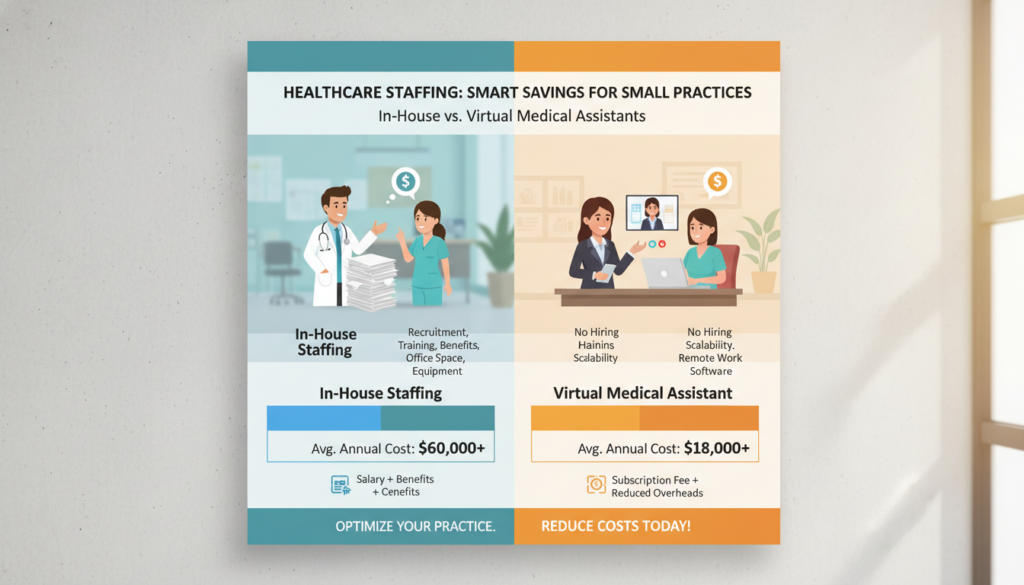
Comparing Salaries and Compensation Packages
Traditional in-house medical assistants in the United States earn between $35,000 and $45,000 annually as base salary. But this is just the start of your investment. Benefits packages add another 20-30% to these wages, including health insurance, retirement contributions, and paid time off.
An affordable medical assistant through virtual services costs much less. You pay between $15 and $25 per hour with no benefits. This means you could save $20,000 to $30,000 annually for each full-time equivalent position.
Virtual staffing offers payment flexibility that traditional employment can’t match. You only pay for hours worked, avoiding costs for sick days, vacation, and unproductive periods. This leads to immediate cost advantages that improve your monthly cash flow.
Hidden Operational Expenses
Outsourcing small clinics eliminates many overhead costs that practice owners often overlook. Workspace and equipment for each in-house employee cost between $3,000 and $5,000 annually. This includes desk space, computers, software licenses, and office supplies.
Additional operational expenses include:
- Payroll taxes at 7.65% of wages for Social Security and Medicare contributions
- Workers compensation insurance premiums based on your state requirements
- Recruitment costs averaging $3,000 to $5,000 per new hire
- Training expenses for onboarding and ongoing education
- Management time for supervision and performance reviews
Virtual assistants work from their own locations using their own equipment. You avoid all these infrastructure costs completely. The service provider handles recruitment, training, and management, removing these burdens from your administrative workload.
Healthcare staffing costs extend beyond the obvious expenses. Turnover creates additional financial strain through repeated hiring cycles and productivity losses during transitions. Virtual services provide consistent staffing without these disruptions.
Projected Long-Term Financial Benefits
The savings from virtual medical assistants grow substantially over time. Most practices recover any implementation costs within 2 to 3 months of making the switch. Your three-year savings typically reach six figures when accounting for all cost factors.
Long-term financial advantages include reduced turnover expenses. Virtual service providers manage staff retention. You also benefit from improved billing efficiency and decreased claim denials through consistent administrative quality. These operational improvements add thousands of dollars to your annual revenue.
Consider how these savings compound over multiple years. The table below illustrates the complete cost comparison:
| Cost Category | In-House Assistant (Annual) | Virtual Assistant (Annual) | Your Savings |
|---|---|---|---|
| Base Compensation | $35,000 – $45,000 | $31,200 – $52,000 | Variable |
| Benefits Package | $7,000 – $13,500 | $0 | $7,000 – $13,500 |
| Payroll Taxes | $2,678 – $3,443 | $0 | $2,678 – $3,443 |
| Workspace & Equipment | $3,000 – $5,000 | $0 | $3,000 – $5,000 |
| Recruitment & Training | $3,000 – $5,000 | $0 | $3,000 – $5,000 |
| Total Annual Cost | $50,678 – $71,943 | $31,200 – $52,000 | $15,678 – $35,943 |
Your practice gains financial flexibility that allows reinvestment in patient care improvements or technology upgrades. These strategic investments further enhance your competitive position and practice growth.
Small clinic outsourcing delivers measurable return on investment through multiple channels. Beyond direct cost savings, you gain administrative efficiency. This frees your clinical staff to focus on patient care, improving patient satisfaction and increasing revenue opportunities.
How Virtual Medical Assistants Enhance Workflow
Adding a virtual medical assistant changes how you work. It makes your practice run better and saves you time. You won’t have to work as hard.
Virtual assistants help with tasks that slow you down. They bring order to your work. This makes your practice more efficient and satisfying.
Creating Consistency Through Standardized Protocols
Virtual medical assistants use standardized protocols for tasks. This stops errors and keeps quality high. It’s better than having different people do things differently.
Insurance verification is a big help. They check coverage at the same time for every patient. This way, you won’t be surprised by coverage issues.
They also make sure patient records are up to date. This keeps everything organized. You can trust your system, even when you’re busy.
Follow-up communication gets better too. Virtual assistants have a system for it. This means every patient gets the right follow-up, every time.
“Standardization is the key to scaling any business. In healthcare, it’s also the key to consistent patient experiences and reduced errors.”
Maximizing Your Available Hours
Virtual assistants take care of time-consuming tasks while you see patients. This lets you do more without working longer. They handle calls, scheduling, and updates.
They’re great for solo practices. They work when you’re not there, like evenings and weekends. This means patients can reach out more easily.
They also do tasks in batches. This means you don’t get interrupted all day. They focus on one thing at a time, making you more productive.
| Time Management Strategy | Traditional Approach | Virtual Assistant Approach | Time Saved Weekly |
|---|---|---|---|
| Patient Communication | Interruptions throughout the day | Batched responses during set times | 5-7 hours |
| Insurance Verification | Done as patients arrive | Completed 24-48 hours before appointments | 3-4 hours |
| Appointment Scheduling | Phone tag during clinical hours | Online scheduling with virtual oversight | 4-6 hours |
| Documentation Updates | After hours or between patients | Real-time updates during appointments | 6-8 hours |
These strategies save a lot of time over time. You can use that time to earn more or enjoy life more. Your practice will grow faster and better.
Reclaiming Hours for What Matters Most
Virtual assistants cut down on paperwork. Doctors say they save 10-15 hours a week. This is time they used to spend on paperwork.
This extra time is very valuable. You can see more patients, earn more, or learn new things. It’s up to you.
But the best part is the time you get back. You can spend it with family, relax, or just rest. This makes you happier and less stressed.
Your practice will also get better. It will be more responsive and reliable. Patients and other doctors will notice the difference.
With virtual assistants, you can focus on what you love. They don’t just help with paperwork. They let you be the doctor you always wanted to be.
Choosing the Right Virtual Medical Assistant Service
Choosing a virtual medical assistant service starts with knowing what your practice needs. Look at what different providers offer. You need to check if they can meet your needs.
Success with virtual support depends on finding the right service for you. Every small practice is different. They have unique needs and challenges.
Identifying Your Practice Requirements
First, evaluate your current operations. Find out which tasks take up most of your staff’s time. Also, see which tasks cause the most problems.
Track your daily tasks for a week. See how much time you spend on scheduling, talking to patients, checking insurance, and managing records.
Consider these important factors:
- Task volume: Count how many appointments you schedule weekly, patient calls, and records you process
- Coverage hours: Decide if you need help during business hours or after hours
- Specialty expertise: Check if your specialty needs specific knowledge
- Current pain points: Identify which tasks cause the most problems
- Growth projections: Think about how your needs might change in the next year or two
Make a list of must-have and nice-to-have tasks. This helps you find a virtual assistant that fits your budget and grows with you.
Calculate how many hours you need by tracking your current tasks. If your staff spends 20 hours a week on scheduling, you’ll need at least that much virtual support.
Verifying Provider Qualifications
The qualifications of healthcare providers are very important. You should have clear criteria for evaluating them before you start looking.
Look for these important qualifications:
| Credential Type | Why It Matters | What to Verify |
|---|---|---|
| Medical Assistant Certification | Ensures foundational healthcare knowledge | CMA, RMA, or CCMA credentials from recognized organizations |
| HIPAA Compliance Training | Protects patient privacy and practice liability | Current certification with regular updates and testing |
| Specialty-Specific Experience | Reduces training time and errors | Previous work with similar practices or medical specialties |
| Software Proficiency | Enables immediate productivity | Experience with your specific EHR and practice management systems |
Check references by talking to other small practices. Ask about their experience, how quickly they respond, and how they handle problems.
Look at the quality assurance processes each provider has. Good providers regularly review performance, provide training, and have supervision.
The most important thing in choosing a virtual assistant is not just their credentials. It’s how well they apply their knowledge to support your practice.
Watch for warning signs of unreliable providers. Look for lack of experience, vague security, unclear agreements, or no references.
Be careful if providers can’t explain their backup plans. You need to know your tasks will be covered even if your assistant is out.
Essential Provider Interview Topics
Ask the right questions to get all the information you need. Prepare a list of questions for every aspect of the working relationship.
Your list should cover these key areas:
- Service scope and limitations: What tasks will the virtual assistant do? Are there any they can’t do?
- Availability and response times: What hours are they available? How fast do they respond?
- Backup coverage: Who covers if your primary assistant is out? Is service quality consistent?
- Software compatibility: Can they work with your systems without extra costs?
- Training process: How long does onboarding take? Who trains them on your workflows?
Keep asking about ongoing operations. Ask about communication methods and who you’ll work with.
Discuss how they monitor performance. Quality providers offer regular reports on tasks, response times, and accuracy.
Clarify contract terms. Ask about commitment periods, notice for changes, and what if service quality is bad. Knowing how to end the contract protects you.
Ask about pricing in detail. Find out if you pay by the hour, task, or monthly. Know about extra fees for rush jobs, after-hours work, or special tasks.
Request a trial if you can. Many services offer 30-day trials to see if they’re a good fit.
The answers will show if a provider understands your needs and can provide reliable support. Take notes and compare different providers before making your choice.
Technology and Virtual Medical Assistants
Modern healthcare tech lets virtual medical assistants work as well as in-person staff. They keep patient data safe. The tech linking your clinic with remote workers is key to smooth outsourcing.
Your systems likely support virtual assistants. Most clinics use software for remote work and cloud access. The trick is setting up the right permissions and secure ways to talk.
Connecting with Your Practice Management Systems
Virtual assistants fit right into your electronic health records. Systems like Epic and Athenahealth support remote work. Your IT team or software vendor can set up access for virtual staff.
Cloud-based systems offer the most flexibility for outsourcing. They let everyone work together in real time, no matter where they are. Changes and updates happen instantly for everyone.
Getting virtual assistants set up is easy. The provider handles the tech stuff. You just check that they can use your system.
The move to cloud-based systems has made working together online easy and safe.
Training virtual assistants on your software is quick. They learn fast and work like they’ve been there forever.
Supporting Your Telemedicine Capabilities
Virtual assistants help a lot with telehealth. They handle the tech and admin tasks. This lets you focus on the patient during visits.
They schedule telehealth visits and send instructions to patients. This makes starting visits easier for everyone.
Before visits, virtual assistants check if everything works. They make sure patients can use the video platform. This cuts down on tech problems.
| Telehealth Task | Virtual Assistant Role | Patient Benefit | Provider Benefit |
|---|---|---|---|
| Appointment Scheduling | Books virtual visits and sends platform access links | Clear instructions and reminders | Full schedule utilization |
| Technical Support | Conducts pre-visit technology checks | Confidence using video platform | Fewer delayed or cancelled visits |
| Virtual Waiting Room | Manages patient check-in and queue | Organized, timely experience | Smooth transitions between patients |
| Documentation | Records visit details and follow-up needs | Accurate medical records | More time for patient interaction |
During visits, virtual assistants manage the digital waiting room. They check patients in and let you know when they’re ready. This keeps things running smoothly.
They also help with paperwork. This makes telemedicine as easy as in-person visits.
Protecting Patient Information
Data security is key for virtual assistants. It keeps your practice safe while you get help from afar. Good providers use many ways to keep data safe.
All talks between your practice and virtual assistants must be safe. You can’t use regular email or texts. Instead, use encrypted messages and secure portals.
Data is kept safe as it moves between places. This makes it hard for others to see. The security is strong, like in-office networks.
Virtual assistants connect safely to your systems. They use VPNs and strong passwords. This is more secure than most office computers.
Agreements make providers legally responsible for keeping data safe.
Using more than one way to log in adds extra security. This makes it harder for unauthorized access. Even if someone gets your password, they can’t get in.
Providers check their systems often. They look for weak spots and make sure everything is up to date. You should get reports on these checks.
Providers sign agreements to protect patient data. They promise to follow HIPAA rules. Never work with someone who won’t sign this.
Training is important for virtual assistants. They learn about keeping data safe and following rules. Providers teach them and test their knowledge.
When looking for providers, ask for proof of their security. Look for things like SOC 2 certification and regular checks. This shows they take data protection seriously.
Training and Onboarding
Starting a virtual assistant in your healthcare practice is more than just a contract. It needs careful planning and ongoing learning. How well you train your virtual assistant at the start greatly affects their success.
Getting a virtual assistant up to speed takes time and planning. Many practices don’t realize how long it takes for them to learn the practice’s ways. Proper training helps avoid mistakes and keeps things running smoothly.
Steps for Successful Integration
Your journey starts with comprehensive workflow documentation. This is the guide your virtual assistant uses to learn your practice’s ways. Without it, confusion and mistakes can happen.
Start by documenting every task your virtual assistant will do. Include how to schedule appointments, communicate with patients, and handle insurance. The more detailed your instructions, the faster they’ll get the hang of it.

Next, give them a full introduction to your practice. Share your mission, describe your patients, and explain any special needs. This helps them make good decisions when things get tricky.
Begin with a few tasks and gradually add more. This way, they build confidence and skills. As they get better, you can give them more responsibilities.
Have regular meetings in the first month. Start with daily, then every other day, and then weekly. This lets you answer questions, give feedback, and make changes as needed.
Make learning easier with resources like:
- Detailed procedure manuals with screenshots and examples
- Video tutorials for complex tasks
- Quick guides for common questions
- Contact info for help
- Templates for common communications
Choose one person to be the main contact. This person helps with questions and makes sure everyone is on the same page. This avoids confusion and builds trust.
Be patient with the learning process. It usually takes two to four weeks for a virtual assistant to get up to speed. Rushing can lead to mistakes and extra work.
Ongoing Support and Training
Supporting your virtual assistant doesn’t stop after they start. You need to keep their skills sharp and their interest high. Practices that don’t invest in ongoing training see their virtual assistants’ performance drop.
Have regular talks to discuss how they’re doing. Monthly meetings can help improve processes and address concerns. This shows you care about their success.
Keep them updated on new procedures or technologies. Your virtual assistant needs training just like your in-office staff. Sharing changes helps everyone stay in sync.
Tell your virtual assistant about any changes right away. This keeps patient interactions consistent and accurate.
Offer chances for them to grow and improve. Support certifications, training in new software, or other professional development. This boosts their skills and loyalty.
Listen to their ideas for improving things. Their fresh perspective can reveal ways to make your practice better. Using their suggestions shows you value their input.
Setting Performance Metrics
Setting clear goals helps you see if your virtual assistant is meeting expectations. Without goals, it’s hard to know what to improve. Using data helps you make informed decisions.
Use both numbers and feedback to measure performance. Numbers give you clear benchmarks, while feedback captures the quality of service. This balanced approach gives you a full picture of how they’re doing.
Track these important metrics:
| Performance Metric | Target Standard | Measurement Frequency | Impact Area |
|---|---|---|---|
| Appointment Scheduling Accuracy | 98% error-free bookings | Weekly review | Patient satisfaction and office efficiency |
| Patient Inquiry Response Time | Under 2 hours during business hours | Daily monitoring | Patient experience and retention |
| Insurance Verification Completion | 100% before appointment date | Daily tracking | Revenue cycle and claim success |
| Task Completion Rate | 95% completed within deadline | Weekly assessment | Workflow reliability and productivity |
| Documentation Timeliness | Same-day entry for 90% of items | Weekly review | Compliance and information accuracy |
Use surveys or feedback forms to check on patient satisfaction. Look at how clear their messages are and how well they handle problems. This gives you a full picture of their performance.
Review their progress regularly. Monthly meetings can help them improve and show you care. Use data to find areas for growth and improvement.
Change your goals as your virtual assistant grows and your practice changes. Start with basic tasks and add more as they get better. Progressive goal-setting keeps them motivated and improving.
Keep records of their performance for future reference. These records help when evaluating contracts, justifying budgets, or training new virtual assistants. They also help you improve your approach to integrating virtual assistants.
Potential Challenges of Using Virtual Assistants
Knowing the challenges of virtual assistants helps you prepare better. Small clinic outsourcing has many benefits, but you need to be ready for the adjustment. Most issues can be solved with good planning and clear communication.
Switching to remote team members is a big change for traditional staff. You’ll face new challenges. But, being aware and prepared can help a lot.
Overcoming Distance in Team Communication
Working with virtual assistants changes how you talk. You might wait longer for answers because they work different hours. This can be frustrating, like when you need quick answers about scheduling.
Being in different time zones adds to the challenge. You need to find times when you both can work together. Without face-to-face talks, misunderstandings can happen more often.
To improve communication, set clear rules. Use instant messaging for urgent things, email for routine stuff, and video calls for detailed talks. This helps avoid confusion.
Here are some tips:
- Have daily or weekly video meetings to stay connected.
- Use tools that show who’s working on what.
- Make detailed guides that reduce the need for constant questions.
- Choose times when you and your virtual assistant are both available.
- Set clear times for when you expect answers.
After a few months, communication gets better. You and your virtual assistant learn how to work well together.
Building Trust in Remote Staff Reliability
Trust is a big issue with remote work. You might worry about relying on someone you can’t see. Questions about their work and availability are common.
You might worry about what happens if your virtual assistant is out sick. With in-house staff, you can see what’s going on. But with remote staff, it’s harder to know.
Good virtual assistant services have plans for these problems. They have backup staff and check on work quality. This makes you feel more secure.
Look for services that offer these things:
- Agreements that say when you’ll get answers.
- Systems that track how well they’re doing.
- Backup staff that knows your practice.
- Regular updates on their work.
- Plans for when things go wrong.
To make sure they’re reliable, set clear goals. Talk about how often you need answers and how well they should do their tasks. Regular meetings help you keep an eye on how they’re doing.
Protecting Sensitive Health Information
Keeping patient info safe is very important. This is true whether your staff is there or not. You need to be extra careful with data when it’s shared online.
Everyone who sees patient info must follow rules. This includes virtual assistants. They must use secure ways to share info and know the serious risks of leaks.
Remote work brings special risks. Data can be stolen if not encrypted. Virtual assistants must keep their work areas safe from unauthorized access.
Good virtual assistant services protect patient info:
- They train staff on keeping info safe.
- They have agreements that make them responsible for privacy.
- They use secure ways to share info.
- They make sure only authorized people can access systems.
- They check for security problems regularly.
- They have plans for if a security problem happens.
Make sure the service you choose is safe. Ask for proof of their security steps. Also, ask about their experience with keeping patient info safe.
Don’t let worries about privacy stop you from using virtual assistants. Many places keep patient info safe with remote staff. It’s all about choosing the right service and following the rules.
Case Studies: Successful Implementations
Many small healthcare providers have found success with virtual medical assistants. These stories show how they overcame challenges and improved their work. By looking at these examples, you can learn what works and how to prepare for your own journey.
These experiences come from different places and specialties. Each faced unique challenges before starting virtual support. Their success shows that this model really works.
Documented Success Across Different Practice Types
A solo family medicine doctor in Montana is a great example of VMA for solo practice success. Dr. Sarah Mitchell had been working alone for seven years. She was overwhelmed by administrative tasks.
She hired a virtual medical assistant to help with scheduling, communication, and follow-ups. This change helped her see more patients without working longer hours.
Dr. Mitchell’s no-show rate dropped from 18% to 7%. Patients were happier with how quickly they were contacted.
In suburban Chicago, a two-physician internal medicine practice faced different issues. Drs. James Park and Linda Rodriguez spent too much time on insurance and billing. They had high claim denials that hurt their cash flow.
They teamed up with an affordable medical assistant service for billing and insurance help. This move quickly improved their situation.
In the first year, they cut claim denials by 35%. They collected more revenue, 22% more, thanks to faster claims and better follow-up. The doctors saved about 15 hours a week.
A small dermatology practice in Phoenix wanted to grow through telehealth. Dr. Michael Chen needed help with virtual visits, patient education, and more communication. He hired virtual assistants for these tasks.
These assistants scheduled virtual visits, sent instructions, made follow-up calls, and managed the patient portal. This allowed the practice to reach more patients across Arizona.
The practice grew by 40% in eighteen months. Virtual visits made up 30% of all appointments. Patients were happier with the ease of getting appointments and communication.
Quantifiable Results That Matter
These examples show real improvements in finances, efficiency, and quality. Knowing these numbers helps you plan and measure success.
Financial gains are clear. Practices save 15-40% on admin costs by using affordable medical assistant services. This includes salary, benefits, training, and space savings.
Revenue goes up in several ways. Better billing means more money in the bank. More patients can be seen without adding staff. Authorization management prevents lost revenue.
| Practice Type | Cost Reduction | Revenue Impact | ROI Timeline |
|---|---|---|---|
| Solo Practice | 25-35% | +15-20% | 3-6 months |
| 2-3 Physicians | 30-40% | +18-25% | 4-8 months |
| Specialty Practice | 20-30% | +12-22% | 6-10 months |
Efficiency gains are also notable. Practices save a lot of time. Tasks done virtually take 40-60% less time.
Response times for patients improve a lot. They get answers in 2-4 hours, not the next day. Prescription refills and insurance questions are handled faster too.
No-show rates drop by 30-50%. This means more appointments and more money for the practice.
Quality metrics show better patient satisfaction and less burnout for doctors. Satisfaction scores go up by 15-25 points. Patients like the better communication and quick responses.
Doctors are happier too. They have better work-life balance and less evening work. They’re more satisfied with their jobs. Documentation gets better with virtual help.
Practical Wisdom From Implementation Experiences
Lessons from these practice success stories are very helpful. They share what they wish they knew before and what they would do differently.
Most practices were surprised by how fast virtual assistants got up to speed. Dr. Mitchell thought it would take 3-4 months. Her assistant was fully productive in six weeks. Starting sooner is good advice.
Clear communication is key. Practices that set up specific ways to communicate and respond did better. Those that didn’t had more confusion.
The Chicago practice learned the value of detailed process guides. They made step-by-step guides for insurance tasks. This helped with training and reduced errors.
Patients were very happy with the faster responses. They liked having someone answer calls quickly and follow up reliably.
Technology integration was easier than expected. Practices worried about software and security. But, good virtual assistant services made it simple. They followed HIPAA rules too.
The Phoenix dermatology practice found benefits they didn’t expect. Their virtual assistants suggested ways to improve. This teamwork added value beyond just tasks.
Start with clear tasks, not vague ones. Successful implementations began with specific jobs like scheduling or insurance. Then, they added more tasks as trust grew.
Regular review meetings are important. Monthly meetings to talk about performance and challenges kept things on track. These talks helped the team work better and find ways to improve.
Lastly, treat virtual assistants as team members, not just vendors. This approach leads to better teamwork, training, and results. Practices that built strong relationships did the best.
Trends in Virtual Medical Assistance
Virtual medical assistance has grown from a cost-saving idea to a key strategy. It’s not just a quick fix for staffing issues. It shows deep changes in how healthcare works today.
Choosing virtual support fits with big changes in the medical field. These changes affect patient needs and how teams work. Knowing these trends helps your practice succeed in the long run, not just solve short-term problems.
Explosive Market Expansion
The virtual healthcare assistant market is growing fast. It’s growing at 30-35% each year. Experts think it will hit $10 billion by 2027.
More than 70% of small clinics now use or think about virtual support. This is a big change from before, when it was rare.
Several things drive this big demand:
- Persistent workforce shortages that won’t go away with old hiring methods
- Rising operational costs making it hard to keep staff in small clinics
- Increased patient expectations for easy access and quick responses
- Technology improvements making remote work just as good as in-person
What started as an experiment is now common. Healthcare providers everywhere see virtual support as key. The question is now “How fast can we start?”
Emerging Technology Capabilities
New technologies are changing healthcare’s future. These changes will make virtual assistants even more useful for your practice.
Artificial intelligence tools are taking over simple tasks. They handle things like booking appointments and checking insurance. They get better at understanding and answering patient questions too.
Natural language processing is another big step forward. It makes writing and understanding medical texts easier. Your virtual assistants will work faster and better.
Advanced analytics help virtual assistants find new opportunities. They spot ways to improve scheduling and catch billing issues. They also help understand what patients need.
Integrated platforms make teamwork between virtual and in-person staff better. They remove the problems of working from afar. Your team works together, no matter where they are.
These technologies make virtual support more valuable and easier to get. Small clinics can have big benefits without the big costs. This level of quality was once only for big health systems.
Healthcare Workforce Evolution
The healthcare team is changing to include both in-person and virtual members. This opens up new chances for clinics that adapt to these changes.
New training programs prepare medical assistants for virtual roles. They learn the skills needed for remote work. They can start working right away, without needing a lot of training.
Professional groups are creating standards and certifications for virtual healthcare workers. These help you know if a virtual assistant is good. They make the field more professional.
Healthcare workers now want jobs that offer flexibility and balance. This means there’s more talent available for virtual roles. You can find the best people, no matter where they live.
Adopting virtual support helps your clinic attract skilled people. You don’t have to limit your search to local areas. You can choose the best candidates, not just who’s nearby.
This change is good for both clinics and workers. You get experienced help without needing to move. Workers find jobs that fit their lives. This leads to happier teams and less turnover.
Understanding these trends shows that virtual medical assistance is the future of healthcare. By adopting it, you’re following the industry, not going against it.
Conclusion: Is a Virtual Medical Assistant Right for You?
Your practice needs support that fits your goals and budget. Choosing a virtual medical assistant depends on your specific needs and what’s important to you.
Core Advantages Recap
Virtual assistance brings big benefits. It can cut staffing costs by 40-60% compared to hiring people. This means you can spend less time on paperwork and more on patient care.
It also helps with scheduling and communication. You’ll feel less stressed when you’re not tied up with admin tasks all the time.
Evaluating Your Practice Needs
A virtual medical assistant is great if you’re overwhelmed with admin tasks. It’s a good choice if hiring staff is too expensive or hard to find. Starting small helps you see if it works without too much risk.
But, if you need staff around all the time or have complex tasks, in-house staff might be better.
Moving Forward With Confidence
Many small practices have found success with virtual medical assistants. They say it improves their work and helps them focus on patients. Virtual support doesn’t replace your care. It helps you give more attention to your patients.
Now, you can look into providers, see how much you could save, and take action. Your next step is to decide which tasks you can delegate.


